How to change Older Post and Newer Post link
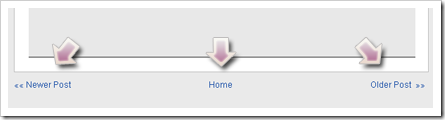
Someone had asked Kang Rohman about how to hide Older Post or Newer Post in blogger, and Kang Rohman had answered the question by posting an article titled “Hiding Older Post and Newer Post Link”. The other question that relates with “Older Post and Newer Post” is asked again, the question as follow:

Subscribe to Blogger Templates Gallery to get daily updates on Free Blogger Templates in your email for free.

Hello,
I am wondering if you can change the words “newer” and “older” to the next and previous post’s titles-I have a screenshot of a blog that has this if you email me I can send it.
Thanks

Is this your question? OK, Kang Rohman will try to answer. The word Older Post or Newer Post can certainly be changed as you want, for example, changed with “Next” or “Previous”, even the words not only can be changed with other words but also can be changed with images or icons. Let’s examine one by one.
Changing Older Post and Newer Post with Next and Previous
Follow the steps below:
Changing Older Post and Newer Post with Icon
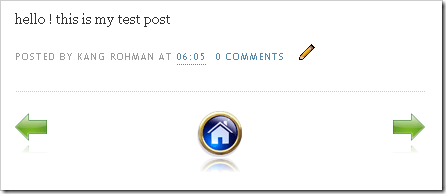
To change Older Post and Newer Post with icon, the first step is preparing the icon which you want to use. For example Kang Rohman has the icons like this:


Please upload the icons you have to a server that you usually use to place an image, and note the URL address. For example Kang Rohman has the icons’ URL address as follow:
https://blogger.googleusercontent.com/img/b/R29vZ2xl/AVvXsEiuAZEwqD5AZgUBDHZR38bkM9XKGXx5UjrvyhvBfvmJE_jFbUmos4n08JzCmk_mn77RFRmgMWnkhyphenhyphenx_VCailHJoer7vXKpm7EDHuBsj1t1RNy6J-7x9LyKEzsLWJ6j8Mr8qna9Y3UwNHFM/?imgmax=800
https://blogger.googleusercontent.com/img/b/R29vZ2xl/AVvXsEhLA-l4moUHvFQffqZsQWCZa3QQlcwRR9ekvt3mA5zlvT_QT0GGAZhU-EFVcgcuZ_Q78kw08PBiMhfMd0HWhKELxAH0wKaif0tNd8MOldKt3RCkiXRxDGQNo_mXEfryynaCBGIAYsBR8Cc/?imgmax=800
https://blogger.googleusercontent.com/img/b/R29vZ2xl/AVvXsEi5Enz1JE3Tm0JHI_ic0Ln65D7xyMuKf5mjY5niv-TZmymbdat9TCyUY3l5cE7QqIAGesoRrUdrrDM0_CDg3yTyyt7k7AfqqpJeq7WxaEToS9ZNTqYCdnyHEJqJfUvjiRBmXrpBmf4z2IE/?imgmax=800
Change the above code into like this:
If you get error messages when editing the template, please try using a different browser
Good luck!
Changing Older Post and Newer Post with Next and Previous
Follow the steps below:
- Log in to blogger with your ID
- Click Layout
- Click Edit HTML tab
- Click “Download Full Template”, please back up first your template (important)
- Please check the small box beside Expand Widget Template
- Wait for a while until the process finished
- Find the following code on your template:
<span id='blog-pager-newer-link'>
<a class='blog-pager-newer-link' expr:href='data:newerPageUrl' expr:id='data:widget.instanceId + "_blog-pager-newer-link"' expr:title='data:newerPageTitle'><data:newerPageTitle/></a>
</span>
</b:if>
<b:if cond='data:olderPageUrl'>
<span id='blog-pager-older-link'>
<a class='blog-pager-older-link' expr:href='data:olderPageUrl' expr:id='data:widget.instanceId + "_blog-pager-older-link"' expr:title='data:olderPageTitle'><data:olderPageTitle/></a>
</span>
</b:if>
<b:if cond='data:blog.homepageUrl != data:blog.url'>
<a class='home-link' expr:href='data:blog.homepageUrl'><data:homeMsg/></a>
<b:else/>
<b:if cond='data:newerPageUrl'>
<a class='home-link' expr:href='data:blog.homepageUrl'><data:homeMsg/></a>
</b:if>
</b:if>
- Look at the code in red printed.
- Change the code <data:newerPageTitle/> with the word Next and the code <data:olderPageTitle/> with the word Previous
- Click Save Template button
- Finished

Changing Older Post and Newer Post with Icon
To change Older Post and Newer Post with icon, the first step is preparing the icon which you want to use. For example Kang Rohman has the icons like this:


Please upload the icons you have to a server that you usually use to place an image, and note the URL address. For example Kang Rohman has the icons’ URL address as follow:
https://blogger.googleusercontent.com/img/b/R29vZ2xl/AVvXsEiuAZEwqD5AZgUBDHZR38bkM9XKGXx5UjrvyhvBfvmJE_jFbUmos4n08JzCmk_mn77RFRmgMWnkhyphenhyphenx_VCailHJoer7vXKpm7EDHuBsj1t1RNy6J-7x9LyKEzsLWJ6j8Mr8qna9Y3UwNHFM/?imgmax=800
https://blogger.googleusercontent.com/img/b/R29vZ2xl/AVvXsEhLA-l4moUHvFQffqZsQWCZa3QQlcwRR9ekvt3mA5zlvT_QT0GGAZhU-EFVcgcuZ_Q78kw08PBiMhfMd0HWhKELxAH0wKaif0tNd8MOldKt3RCkiXRxDGQNo_mXEfryynaCBGIAYsBR8Cc/?imgmax=800
https://blogger.googleusercontent.com/img/b/R29vZ2xl/AVvXsEi5Enz1JE3Tm0JHI_ic0Ln65D7xyMuKf5mjY5niv-TZmymbdat9TCyUY3l5cE7QqIAGesoRrUdrrDM0_CDg3yTyyt7k7AfqqpJeq7WxaEToS9ZNTqYCdnyHEJqJfUvjiRBmXrpBmf4z2IE/?imgmax=800
Change the above code into like this:
<img alt='Next' border='0' src='https://blogger.googleusercontent.com/img/b/R29vZ2xl/AVvXsEiuAZEwqD5AZgUBDHZR38bkM9XKGXx5UjrvyhvBfvmJE_jFbUmos4n08JzCmk_mn77RFRmgMWnkhyphenhyphenx_VCailHJoer7vXKpm7EDHuBsj1t1RNy6J-7x9LyKEzsLWJ6j8Mr8qna9Y3UwNHFM/?imgmax=800' title='Next'/>
<img alt='previous' border='0' src='https://blogger.googleusercontent.com/img/b/R29vZ2xl/AVvXsEhLA-l4moUHvFQffqZsQWCZa3QQlcwRR9ekvt3mA5zlvT_QT0GGAZhU-EFVcgcuZ_Q78kw08PBiMhfMd0HWhKELxAH0wKaif0tNd8MOldKt3RCkiXRxDGQNo_mXEfryynaCBGIAYsBR8Cc/?imgmax=800' title='previous'/>
<img alt='home' border='0' src='https://blogger.googleusercontent.com/img/b/R29vZ2xl/AVvXsEi5Enz1JE3Tm0JHI_ic0Ln65D7xyMuKf5mjY5niv-TZmymbdat9TCyUY3l5cE7QqIAGesoRrUdrrDM0_CDg3yTyyt7k7AfqqpJeq7WxaEToS9ZNTqYCdnyHEJqJfUvjiRBmXrpBmf4z2IE/?imgmax=800' title='home'/>
If you have had the code as above, the next step is to place it on your template code, here are the ways:<img alt='previous' border='0' src='https://blogger.googleusercontent.com/img/b/R29vZ2xl/AVvXsEhLA-l4moUHvFQffqZsQWCZa3QQlcwRR9ekvt3mA5zlvT_QT0GGAZhU-EFVcgcuZ_Q78kw08PBiMhfMd0HWhKELxAH0wKaif0tNd8MOldKt3RCkiXRxDGQNo_mXEfryynaCBGIAYsBR8Cc/?imgmax=800' title='previous'/>
<img alt='home' border='0' src='https://blogger.googleusercontent.com/img/b/R29vZ2xl/AVvXsEi5Enz1JE3Tm0JHI_ic0Ln65D7xyMuKf5mjY5niv-TZmymbdat9TCyUY3l5cE7QqIAGesoRrUdrrDM0_CDg3yTyyt7k7AfqqpJeq7WxaEToS9ZNTqYCdnyHEJqJfUvjiRBmXrpBmf4z2IE/?imgmax=800' title='home'/>
- Log in to blogger with your ID
- Click Layout
- Click Edit HTML tab
- Click “Download Full Template”, please back up your template first (important)
- Please check the small box beside Expand Widget Templates
- Wait for while until the process finished
- Find this code on your template:
<span id='blog-pager-newer-link'>
<a class='blog-pager-newer-link' expr:href='data:newerPageUrl' expr:id='data:widget.instanceId + "_blog-pager-newer-link"' expr:title='data:newerPageTitle'><data:newerPageTitle/></a>
</span>
</b:if>
<b:if cond='data:olderPageUrl'>
<span id='blog-pager-older-link'>
<a class='blog-pager-older-link' expr:href='data:olderPageUrl' expr:id='data:widget.instanceId + "_blog-pager-older-link"' expr:title='data:olderPageTitle'><data:olderPageTitle/></a>
</span>
</b:if>
<b:if cond='data:blog.homepageUrl != data:blog.url'>
<a class='home-link' expr:href='data:blog.homepageUrl'><data:homeMsg/></a>
<b:else/>
<b:if cond='data:newerPageUrl'>
<a class='home-link' expr:href='data:blog.homepageUrl'><data:homeMsg/></a>
</b:if>
</b:if>
- Look at the code in red printed
- Change the code <data:newerPageTitle/>, <data:olderPageTitle/>, and <data:homeMsg/> with your icon code. E.g.
<span id='blog-pager-newer-link'>
<a class='blog-pager-newer-link' expr:href='data:newerPageUrl' expr:id='data:widget.instanceId + "_blog-pager-newer-link"' expr:title='data:newerPageTitle'><img alt='Next' border='0' src='https://blogger.googleusercontent.com/img/b/R29vZ2xl/AVvXsEiuAZEwqD5AZgUBDHZR38bkM9XKGXx5UjrvyhvBfvmJE_jFbUmos4n08JzCmk_mn77RFRmgMWnkhyphenhyphenx_VCailHJoer7vXKpm7EDHuBsj1t1RNy6J-7x9LyKEzsLWJ6j8Mr8qna9Y3UwNHFM/?imgmax=800' title='Next'/></a>
</span>
</b:if>
<b:if cond='data:olderPageUrl'>
<span id='blog-pager-older-link'>
<a class='blog-pager-older-link' expr:href='data:olderPageUrl' expr:id='data:widget.instanceId + "_blog-pager-older-link"' expr:title='data:olderPageTitle'><img alt='previous' border='0' src='https://blogger.googleusercontent.com/img/b/R29vZ2xl/AVvXsEhLA-l4moUHvFQffqZsQWCZa3QQlcwRR9ekvt3mA5zlvT_QT0GGAZhU-EFVcgcuZ_Q78kw08PBiMhfMd0HWhKELxAH0wKaif0tNd8MOldKt3RCkiXRxDGQNo_mXEfryynaCBGIAYsBR8Cc/?imgmax=800' title='previous'/></a>
</span>
</b:if>
<b:if cond='data:blog.homepageUrl != data:blog.url'>
<a class='home-link' expr:href='data:blog.homepageUrl'><img alt='home' border='0' src='https://blogger.googleusercontent.com/img/b/R29vZ2xl/AVvXsEi5Enz1JE3Tm0JHI_ic0Ln65D7xyMuKf5mjY5niv-TZmymbdat9TCyUY3l5cE7QqIAGesoRrUdrrDM0_CDg3yTyyt7k7AfqqpJeq7WxaEToS9ZNTqYCdnyHEJqJfUvjiRBmXrpBmf4z2IE/?imgmax=800' title='home'/></a>
<b:else/>
<b:if cond='data:newerPageUrl'>
<a class='home-link' expr:href='data:blog.homepageUrl'><data:homeMsg/></a>
</b:if>
</b:if>
- Click Save Template button
- Finished

If you get error messages when editing the template, please try using a different browser
Good luck!
If you enjoyed this article, subscribe to receive more great content just like it.
Subscribe to Blogger Templates Gallery to get daily updates on Free Blogger Templates in your email for free.
News & Update
Insert your email address to receive updates
Blogspot tutorial, Free Template and site Info.

Blogspot tutorial, Free Template and site Info.
Copyright © Blog Tutorial, Free blogger Templates and SEO Learning 
Powered by Blogger



45 Comments:
Post a Comment
Comments in moderation due to spam reasonsLink to this post